Showing posts with label computers. Show all posts

Wednesday, February 11, 2026

Changing My Password

Wednesday I was back at the continuation high school. And... Meh. The teacher was chaperoning a field trip whale watching. I had one student per class period. Yeah. Seriously. 

Alas, at the end of the day they had not seen any whales. They did see lots of dolphins, though. 

But I had one major thing I had to do on this day, and it had nothing to do with the students. 

Last summer, the district implemented a bunch of new security protocols. There were some breaches. Nothing bad has happened as of yet, but the IT people are concerned. So, two factor authorization became mandatory, and passwords now have to be at least 15 characters long and include a capital letter, one of the other special characters, a number, an incantation to summon the rain god, and the name of our first grade teacher. 

Well, maybe not quite all of those. 

And, of course, now passwords must be changed every three months. 

To change the password, one must use a district-issued device. Of course, as a sub, I do not have a district-issued device checked out to me. (I do get one when I'm on a long-term assignment.) And most teachers nowadays have laptops checked out to them that they don't leave in their classrooms for their subs to use. 

Some classrooms still have very old desktops. And some classrooms have newer desktops. So, knowing that it's been about three months since I changed my password, I was delighted to see a district-issued device that I could access in Mr. P's classroom. Which meant that this was the day that I could update my password so I don't have to worry about this again until May. 

I had a new password picked out and everything. 

Second period was my prep. As soon as my first period student left, I went about logging in and getting that password changed. 

And for the next hour... 

Because, yeah. I spent an hour on this ridiculousness. 

I mean, the actual changing of the password was pretty quick and painless. It was just in updating everything that uses that password that took for-ev-er. 

So, there's the login to the district computers. And my emails. (I have two with the district.) Then there was the login I'd used to login to the computer I was using, so every tab I had open suddenly didn't work. I have the district email on my phone, so that had to be updated. As well, I had to update my Wi-Fi access, as I can access the district Wi-Fi, but only via my username and password. 

And then the big problem. I had to re-login to Google on my phone, as that's what I'm using for my 2FA (because texting a code led to other issues), and that required 2FA, and... 

Like I said, an hour. 

And so, now I don't have to worry about this again. Until May. Sigh. 

All done. All clear. Until the next day when my computer wouldn't log in so I could take attendance, and I took way too long to find where to update the Wi-Fi password on that computer. Because of course there would be one more thing I hadn't quite updated. 

Whew. 

*My first grade teacher's name was Mr. Elm. 

Wednesday, October 15, 2025

In Trouble

Monday. Fifth period AP English (twelfth grade, literature). 

All the classes had assignments on paper that had to be turned in at the end of the period. Ms. A noted that otherwise she couldn't be sure the students weren't "consulting" ChatGPT at home. (I had a period of freshman English and a period of junior English before the seniors.) 

I had to remind the class the assignment was due at the end of the period as it took them some time to get working. But they all finished and turned in their work before the end of the period. 

As usual, I left a very detailed note for Ms. A. Her initial response: 

I am not surprised by ANY of what you noted. Those baseball boys in the corner. Aye! Aye! Aye! 

She was referencing a comment I made about some eleventh grade boys having long conversations that didn't touch on any of the essay they were supposed to be writing. But then I got a follow up email on Wednesday: 

Hello! Quick question: Did my AP 12 students have computers with them on Monday? I am reading their assignments and they sound too good? Also, upon opening one of the Chromebooks today, a student noticed they were on chatgpt asking a Death of a Salesman question.

Oops. Because, yeah, some of them did have computers. I didn't think much of it at the time. It is something I totally should have caught as they had to go and get computers (they were not out). 

I encountered something similar last school year while on the long term for the eleventh grade English class (those students now in the twelfth grade). Some of their answers were too good. I didn't believe some of them had done their work without ChatGPT assistance. 

So, yeah, I should have clocked that. 

I admitted my lapse. Ms. A wasn't upset with me. But she wasn't happy with her seniors...

Uh oh. They were in trouble...

Thursday, September 18, 2025

Modern Pranks

Wednesday. Seventh period. As usual, I was standing outside the classroom "greeting" the students as they walked in.

"Your computer turned off..."

As they walk in the room, I have a slide up on the TV. Usually it's the agenda for the day, but since rearranging the room (see yesterday's post), I had their new seating chart on the screen so those who weren't sure where they sat could find their seats. 

I had gone into the power settings on my computer ages ago so that it wouldn't go to sleep while I was using it. (I have it timing out after two hours.) That it would just shut off...

And that's when I realized what had happened. It hadn't just shut off. Someone turned it off. 

It's a thing they do. The kiddos will reach over and turn off each other's computers. Log them out. I'm not sure which key combination does it, but it's two keys, and they can do it fast. 

As they came in, I logged back into the computer. But whatever key trick it is on Chromebooks does a strange thing to laptops--it puts the function key on lock. Which I discovered the hard way when I went to reinstate the music I usually play in the background for them. Deep sigh. 

I growled at them. They denied it was them. (It wasn't "them". It was one student. They probably saw who it was, but they weren't saying.) 

I quickly keyed in my password, found my files, and pulled up the slides for the day. And then we got to work. 

I managed to get through the lesson. I couldn't put on music. (The next day I sat down with the computer and figured out how to disengage the function key lock.) And now I know I have to watch my computer as well as all of them as they come into the room. 

Grrrr.

Wednesday, January 22, 2025

Parsing the Fine Print

Seventh grade world history. Monday, third period. 

Every teacher has one. For this teacher, it's third period. They've been in play mode since I met them. 

For the beginning of the semester, they've started studying medieval Europe. They were given a poster assignment. It's mostly about Joan of Arc, but it's also about the Hundred Years War. Ms. B gave them all the info they needed to include on the poster on slides in Google Classroom. (Apparently they've done this sort of thing before all through the first semester.) 

In the instructions, there was a big warning: do not trace from the computer screen. 

But alas, seventh graders. Tracing things has become de rigeur for them. They whine that they can't draw, that their work doesn't look good, and that they need to trace pictures. 

I point out that this is not an art class. We're not looking for perfection. We just want them to use their own creativity. 

So, on Monday, I was again pointing out that they were not to trace their pictures...

Student: "Can we trace from our phones?"

Deep sigh. 

The middle school rule is phones are put away in backpacks. If I see them, I get to confiscate them. And, I reminded them of this rule the previous week. I would think that if phones are forbidden... But seventh graders. 

Student: "It says no tracing from the computer. It says nothing about phones. Ms. B lets us..." 

So, I reiterated NO TRACING, pointing out that phones aren't to be out during class. 

But no, that wasn't good enough. The student said he'd email Ms. B. 

Later that day, I got an email from Ms. B about other things, but she mentioned getting an email from a student about tracing from his phone. Her take? They shouldn't have their cell phones out ("they are sneaky") and no tracing. 

Exactly what I said. Well, mostly. 

They really shouldn't doubt my word. (If I'm not sure about something, I will hedge, then clarify with the teacher. But if I give an instruction, I'm fairly certain I'm making the right call.) But middle schoolers. 

So, no one tried to trace again, right? A couple class periods later, I found a student tracing the pictures from his computer. Sigh.

(I'm still learning the students, but I'm about 50% sure it was the student who emailed the teacher. Because, of course.)

Wednesday, October 25, 2023

It's All Arabic to Me

Eighth grade history. Tuesday.

Before school, I had borrowed one of the classroom's Chromebooks so I could take roll and such. I opened the computer, and I was greeted by a sign in screen written completely in Arabic. 

I mean, that's a new one. I'm used to the computers having the wrong keyboard enabled (so when a student attempts to type, the wrong letters pop up). It's an easy fix, which is perhaps why I haven't seen it recently. 

Before that, it was rotating the stuff on the monitor either to the side or completely upside down.

It's like the kiddos figure out how to do something, and then they leave the computer like that just to cause problems for the person that comes after. 

But it's not a huge issue. Mostly, the next kiddo to get the computer puts it away and gets another. I occasionally get a complaint, but I can fix those issues, so it takes no time to have the student up and running.

But how do you change the language on the computer? 

It was a problem I could deal with when I had some time, as I didn't right then, so I set the computer aside to deal with after I had started class. 

Once the kiddos were working on the day's assignment (they had textbook pages to read followed by workbook pages to answer questions on), I had time to focus on fixing the computer. 

There was no way to change the language on the sign in screen, so I went to sign in. The keyboard was in English, so I signed in easily.

And then the computer self-corrected, putting itself in English and giving me a dialog box with the option of switching it back to Arabic.

I did not switch it back to Arabic.

Problem solved.

And I file that away so the next time that comes up, I'm ready. Because that'll come up again. Someone is going to do that until they figure out that it isn't causing anyone any problems.

Thursday, September 21, 2023

Nailbiter

Wednesday was my last day in the English 9 classes. 

When I began the classes (oh so long ago--3 1/2 weeks prior) I had requested and received access to the class' gradebooks. (I had to set them up. Link them. And get all the grading that had been done input.) 

The one hiccup was in the transition, the seating charts that Mr. P had made went poof. I had to recreate them. (Usually I keep a copy on paper, but I hadn't had a chance to print out a copy with all the other things I was trying to keep up with.) Yes, there is a way to do seating charts in the attendance software, and it makes taking roll go so much more quickly.

Knowing this, I was a bit paranoid about the gradebooks. Would they go poof when Mr. V got full access? 

There was a way to make a PDF copy. So, Monday evening I did. 

But Tuesday and Wednesday... 

The progress reports had gone out. The students were suddenly very interested in what assignments they were missing. 

(The previous week, they had a good hour of class time--some had longer--to go through their grades, see what was missing, and talk to me about it. Some did. Most spent the time playing games on their Chromebooks.)

So, I was getting late work. Some students hadn't started the class with everybody, so they had assignments that they weren't responsible for. (That's an easy enough fix, but they had to tell me as I only knew who was in the class when I started. I didn't know if they started the first day or later. If later, some of Mr. P's assignments didn't count.) 

By Wednesday I had made multiple adjustments to the gradebook.

Mr. V got his district account set up Wednesday. 

Because of computer access, I couldn't back up the gradebook again from school. I planned to do it from home. I got home, only to find that the classes had been removed from my account. 

And now I was worried. Would I be able to recall every change I had made since Monday? Or did the gradebooks make the transition to Mr. V intact? 

Luckily, I had his cell phone number, so I texted him.

It turned out, they had. And I breathed a huge sigh of relief.

Fully removed from the class, I no longer had to think about it at all. Yay!

(Although, Mr. V doesn't have the right access to take the Google Classrooms for the classes. Yet. That's in process, and I can hold onto them until I can pass them over. He just can't give them digital assignments until then.

And, on Friday, I learned that one lone student hadn't been transferred out of "my" class with the group. I only learned this when the attendance clerk chided me for not submitting attendance. On a day I did not work.)

Thursday, August 17, 2023

The Monitor

Friday at the continuation high school. Computer aided drafting (or CAD). I have covered this class many, many times. Just not in this classroom.

At some point last school year, Mr. G switched classrooms with Mr. F, the math teacher. The move made sense as Mr. G needs more room for his "toys" and Mr. F just needs enough room for desks. (Mr. G's "toys" include a 3D printer and a spot where the students can construct small robots.) 

The bigger room also gave me a good spot to sit behind the students' desks.

What usually happens in this class is that the students say they're working, but when I watch what they're doing from the teacher's desk (there's spy software that lets me see what's on their screens), I see that they're actually playing games

Fourth period. While much of the class was on task, two boys were over in a corner, whispering. I finished inputting the attendance, and then I went back to monitoring what was on their screens. The boys were playing some shooter game. 

So, I went back to my perch for the day.

I took a chair behind the kiddos. I could see what was on each of their monitors. I mean, I could see that from the teacher's desk, too, but by sitting behind them, it was obvious I was paying attention to what they were doing.

The boys? They were suddenly on IXL. (IXL is a math program.) 

One boy explained that Mr. G was having him build and organize stuff for the classroom. Knowing the situation and Mr. G, this tracks. The boy would have been getting credit for helping Mr. G set stuff up. So, no Mr. G, no work for the day. Instead, he was going to do his math work.

I was fine with that.

(I'd rather they spend their time in school productively. They can play games at home.)

And so, I sat there, behind them, zoning out. And they kept their computer monitors on stuff that looked schooly. A win. Sort of.

Alas, some of them just hid their phones with their bodies and did nothing anyway. Sigh.

Wednesday, August 2, 2023

Oh, the Drama

And so, it begins again.

School doesn't officially begin until August 10th. But, the continuation high school had been in session for a week. The class was "Adult Re-Entry". I have not covered this class in years, but I am familiar with it. (I wrote about it many times, but here are three posts from back then: one, two, and three.)

(Re-entry is a class for young adults who just missed graduating from high school. The class is four hours long, and they spend their time working on whatever credits they are missing. It's a very chill day.)

The students don't arrive until 10 AM, but the continuation high school starts at 8:30, so I was very early. (We're supposed to report to the school site a half hour before class begins.) So, I got into the classroom and I was prepping for the day (read: checking my personal email and reading blogs).

At 8:40 there was a knock at the door. Duke informed me that Mr. G lets them come in early if they arrive early. As I had nothing better going on, I didn't see the harm in it.

Duke got a computer and attempted to log in. Alas, he couldn't remember his username and password. He had saved them on his phone, but alas, he had left his phone at home.

He asked to use the classroom phone to call his sister. 

It took him a couple tries to call out. (They have to dial a number before to indicate an outside line, and then we have to use 1 + area code to dial all phone numbers in our area. But as I knew all this, I was able to help him get the call to go through.) He got a hold of his sister, but she was unable to help. 

I know their user credentials live in a screen I don't have access to. But I know who does. She gave me Duke's username and password, and Duke was able to log in. To the computer. But not to the program.

While attempting to get a hold of the counselor who has access to the program's data, Duke got a call back from his sister. 

I only heard Duke's portion of the conversation. "Bruh... Why'd you have to tell me this?"

He was clearly upset. He wanted to know why his sister had to call him to tell him whatever it was while he was at school. He wondered why she couldn't have waited until he got home. Then he informed me that he wasn't going to be able to concentrate, so he was going to leave. 

I was once again alone, but class hadn't started, so that was no surprise. 

There's a reason why these students didn't graduate "on time". But at least they're making the attempt, distractions notwithstanding.

Wednesday, March 1, 2023

A Modern Horror Story

When I checked in for the day, the school's secretary didn't hand me the usual paperwork. Usually I get a temporary log in for the school's attendance system.

I was informed that the internet was out.

Nowadays, the majority of the students' work is online. Teachers give lecture notes using slides. Assignments are uploaded to Google Classroom where the kiddos can complete and turn in without needing to touch a pencil. 

No internet was very bad news. But it would be back on shortly, right? 

At least, that's what I figured first period when I explained the day's assignment to the eighth graders. It was U.S. history, and the teacher had copied a paper packet for them to complete. As it was Black History Month, it was a packet on some African-American firsts. 

Unfortunately, they were supposed to use the internet to look up the answers. 

But, they had phones. They could look things up using their phones. And they could work together, so those who were without phones could work with someone who had a phone.

Because, the day they actually need their cell phones is the day that some of them don't have them. Naturally. 

We did not get internet back that day. I still don't know what knocked it out. 

At least the eighth grade assignment wasn't wholly dependent on the computers. Alas, the seventh grade assignment was.

The seventh grade world history class had notes and questions in their Google Classrooms.

Helpfully, the seventh grade classes were "advanced", meaning they're the ones more likely to do the work. And they tried.

There was one kiddo who shared his phone's hotspot with a couple other students, so they worked online. Some of them had Google Classroom on their phones, so they could access the notes that way. But others didn't have any way to access the day's assignments.

I assured them that no internet meant they wouldn't be penalized for not completing the assignment.

The joys of technology. We get dependent on it only for it to fail us. Sigh.

Friday, February 24, 2023

Observed

Honors Anatomy. Thursday. Fifth period.

It had been a pretty low-key day. The kiddos had work in their Google Classrooms. Many of them were actually doing it. 

"Why is Mr. M in my assignment?" 

"Wait. Where?"

"Now he's in mine."

That had been happening all day. On assignments in Google Classroom, the teacher can go into any student's doc and see what the student has done, whether it's turned in or not. It's a trick I was taught during distance learning. Then, teachers were using it to make sure the remote students were actually on task.

Me: "He's probably bored in his meeting. He's just checking in on you. Say 'hi'."

So, one student typed an emoji in his doc. But Mr. M had moved on. The student was disappointed.

It was funny how the students were so excited that Mr. M was virtually in their class. And for me, it told me that they were actually doing what they were supposed to be doing. (I mean, I had walked the room and checked to make sure their computers were on what they were supposed to be on.) 

If the students hadn't been working on the assignment, they never would have seen Mr. M observing. You can only see who's "editing" the documents when you are actively in the documents. 

A bit later, the student who hadn't gotten a response from Mr. M got a response. Mr. M went back and typed something. He was happy.

I think most of them got their work done so they didn't have any homework over the four-day weekend.

Friday, January 27, 2023

Kicking Him Out

Friday. Snack time. 

(Snack is a ten minute pause between the first and second classes of the day.)

All the students filed out of the room, except for one. He was still on his computer, playing a game...

I gave him a minute or so. Then I headed over.

"Time to go."

"Just a couple more minutes? If I exit the game now, I lose points..."

Now, besides the fact that he should have spent class time on, oh, I don't know, maybe his math assignment rather than a video game, I wasn't about to grant him the time as it was my break time.

Because of the way the block schedule is set up at this school, after snack, I have a long two classes to get through before lunch. This is a little more than three hours. That's a little more than three hours until I can once again leave the room and use the restroom.

I told him I needed the restroom, so he had to leave. He stalled.

"I'll close the door when I'm done."

I had been warned not to let the students near the teacher's stuff as she had experienced some thefts. I was no way no how leaving a student in the classroom unattended. 

Apparently his game finished, and he logged off his computer, grabbed his stuff, and left. 

I still had enough time to make it to the restroom and back before the next class. 

But I mean, seriously? He knew when the period ended. I gave a clean up warning minutes before that bell rang. He couldn't have figured out that he didn't have time for another round of his game? 

Wednesday, September 14, 2022

Substitute Training

They don't train substitute teachers. We kind of get thrown into the classroom after a quick orientation after being hired. It's a very learn-on-the-job kind of gig. 

As the classrooms acquire new tech, we subs have to kind of figure things out as we go. Luckily, the teachers need us to use things from time to time, and they'll clue us in on how to use them. 

Tuesday. It was the teacher's first class of the day. The students got out their Chromebooks and logged on as I figured out where the roll sheet was. The phone rang. 

Mr. J was out due to some family emergency, and he was calling to let me know what the class was doing. But more importantly, he needed me to reset the Chromebooks. 

He explained that it was something he does every year. The students were doing a light simulation activity, but it wouldn't load due to cookies and such. Every year he does a hard reboot on the computers so that the loading issue doesn't occur, but due to the family emergency, he hadn't gotten around to it.

So, I got to learn how to do a hard reboot on a Chromebook. Yay. New skill. 

(By the way, it's holding down three keys at once: escape, refresh, and power. That opens the screen that allows you to command the computer to reboot.) 

After getting one computer rebooted, I hung up with Mr. J and informed the class of 8th graders why I had been on the phone so long. (They're always a little shocked that I was talking to their teacher. I think if they had known that, they wouldn't have been as loud while we were talking.) And then it was time for them to repeat what I had just done.

Because the quickest way to reset 36 computers is to have the kiddos reset the computer they have in front of them (and for me to repeat on the remaining five that weren't claimed by a student). 

It was an advanced 8th grade class, so it went pretty smoothly. And the kiddos told me that they could then access the activity they were to do.

Until one girl called me over, more than half way through the period. She couldn't submit the assignment she had completed. 

We did the usual restart of the computer, but that didn't work. Would rebooting the computer again help? 

Yup, it did. 

So, now I have a new trick to pull out when the technology fails. 

Thursday, August 25, 2022

Adjusting on the Fly

Because of our new online sub scheduling system, Mr. P knew who his sub would be before his week out started, and he emailed me the lesson plans. 

While normally the classes would be making something with clay (ceramics class), because it was the first full week of school, the students had assignments on the computer. (They were to read the syllabus and to learn about the elements of art and principles of design.) 

I am now very familiar with Google Classroom, so when I saw the plans, I asked Mr. P to add me to his classes so I could troubleshoot any issues. Because I knew there would be an issue.

Thursday. I logged into the computer and double checked the day's assignments. They were scheduled to post... on Friday. Sigh.

Yes, I was very glad that I had access. It was very easy to post the lessons for the day, and the only thing the students noticed was that I had posted the day's assignments rather than Mr. P. 

And this is why I'm glad I insisted on being added to the class. (It's really easy to remove myself from the class after I'm done.) It's so much easier for me to just fix the issue while I'm in class rather than having to try to contact the teacher. (And since I don't know why he's missing class, getting a hold of him might be difficult in the moment.) 

Thursday, June 16, 2022

The Tech Works

About a month ago, I was going through my work email saved files looking for the calendar for the next school year. As I was digging through that, I found a bunch of emails I had saved for various reasons that I no longer needed. 

Well, I'm sure you know what happened next. I spent some time (it was a moment when I had some time) going through and deleting a bunch of things that I no longer needed. There was the email which contained the calendar for the previous school year. There were various COVID testing emails. There were links to PowerPoints for student testing that had long passed.

And while I was at it, I found the email that contained a link to a PowerPoint on how to connect the school-issued computer to the classroom projector remotely.

What were the chances I'd need that information again? 

Pretty good, I thought. I mean, the last time I was covering a class at that school, it was September. And I didn't need to remotely hook up the computer. But, I figured that there was a good chance I'd need that information again, and since I didn't use it daily, I'd need the resource.

On the first day of the trainings for this summer school class, I patted myself on the back. One of the things that I did do that day was to check out a school computer from the library, and I got it hooked up to the in-class projector. I absolutely used that PowerPoint to get the thing going. 

And I thought about that day when I found that email. 

I'm so glad I was thinking ahead. I just didn't realize how soon I was going to need that information again.

Friday, June 3, 2022

The Evidence

I have mentioned Natalie's obsession with her computer before

Most of the time, when she has computer time, she goes on YouTube and watches station identifications over and over again. Lately, I've noticed she goes to CNN 10 and replays the video we watched earlier that day. She likes to replay bits over and over. I think she likes the sounds. She'll mimic them sometimes.

The other thing she does that she's not supposed to do is to open up her camera and take videos.

Early on, I put tape over her camera. I expected her to object, but she's left it alone the whole time. I don't think she notices the non-picture. I think she's doing it for the audio. 

But be that as it may, we don't want her recording random things in the classroom. (Who knows what conversations she's catching?) 

I thought I was stopping her from recording. I was wrong.

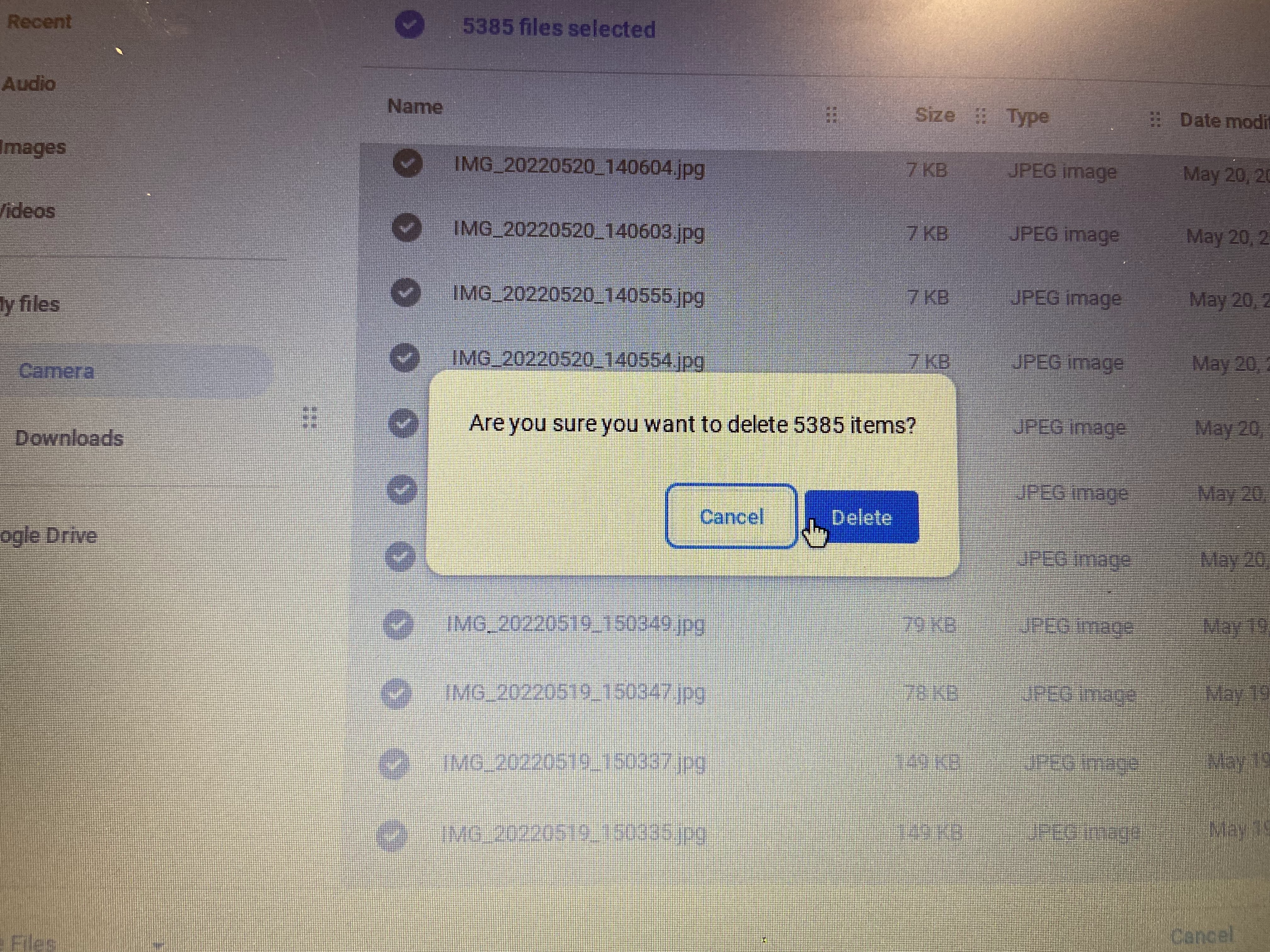
Last week, as I was clearing her computer, the camera app popped up. And I just happened to the file of what was saved. And it was a bit shocking...

That's more than 5000 images. As you can see, I was deleting all of them. The majority of them were just the blank screen (as I had put tape over the camera), but there were a couple with an image of Natalie's forehead. 

Then I got to the videos...

Over 3000 videos. 

If I had more time and more help, we would totally have someone spend the day with Natalie and work on having her do something besides take videos of a blank screen and her banging on her table. But as it is...

And she still manages to save a dozen or so new files daily (now that I'm checking daily). Sigh.

Thursday, April 28, 2022

X-ed Out

When Natalie gets computer time, she goes from video to video on YouTube. She has not figured out how to exit. She just opens new tabs. 

At the end of a day, her browser looks like this: 

Just in case you were wondering if you have too many tabs open... 

So, every day, I go through and exit all of the tabs for her. Because she doesn't go back to them ever. 

Computer time is what Natalie wants, so computer time can be weaponized when she isn't listening. 

Last Thursday, Natalie snuck into the classroom during snack time. (Well, ambled in while we were busy.) When I followed to bring her back outside, I found her again on Penelope's iPad, attempting to get to YouTube. Or something. 

(Penelope's iPad is always open to her communication app. She can toggle through and indicate what she needs. Penelope can speak, but she doesn't say much, and it's hard to understand her due to her cerebral palsy.) 

The last time Natalie did that I took away computer time. This time, I gave the same consequence. 

Alas, it was more a punishment for me.

I gave Natalie a task. (They have "task boxes". The one I gave her had her sorting different colored Legos into little compartments.) She refused to do it. I told her if she completed the task, I would allow her back on her computer. She still refused to do it.

Her refusal wasn't verbal. She sat at her desk for a while. Then she got up and ambled around the room. She came up to the teacher's desk. So, I put away my computer. (At this point I had hidden Natalie's computer away as well as Penelope's iPad.) 

I put Natalie back at her desk. She sat for a while. Then she got up and ambled towards the front again. 

They had delivered the food for lunch. Natalie went to investigate. 

I moved her back to her seat. 

Natalie got up to go outside. Since Domingo stays outside, Earl blocked her way. They talked for a bit. (Earl did most of the talking.) Then Earl urged her inside. 

Then Natalie got up and ambled towards the front... 

This repeated for an hour and a half. 

Finally (once I finished the task I was working on), I sat with her for the last ten or so minutes before lunchtime. 

Natalie is exhausting when she loses computer time. But she can't be using other students' devices. I just hope one of these days she figures out that the shiny electronic device that isn't hers is not hers to touch. 

I don't hold out much hope of this happening.

Wednesday, March 30, 2022

A Bad Idea

All Natalie wants is to be on her computer. 

Just in case you thought all I had to deal with were Doris issues and Domingo issues, nope. While trying to settle them, Natalie will amble over to her computer, neglecting whatever task we have set her. 

I spend all of their break time watching Natalie. Because at some point she's going to head for the classroom and for her computer. If she fails at getting into our class, she will go into the other rooms. She will attempt to use other students' devices. 

She gets computer time. At the end of the day, they all do. They just have to do work first. 

When Natalie is on her computer, she frequently logs off of it. She knows the restart trick for when she gets stuck. 

But she does not know how to log back in. 

All of the student computers use the student's district-assigned email address as their username. It's something the general ed students learn early. It's just their first initial, last name, and some portion of their student ID number (whether from their district ID or the state one, I have no idea). That is followed by the usual email stuff, which because school district, is more complicated than gmail [dot] com. (If you have ever emailed a teacher via their school district, you know what I'm talking about.) 

So, I am teaching Natalie her username. 

It only took a day for her to get the first initial, last name part down. (For where we're at, she's a pretty sharp cookie. Not compared to others her age of course, but compared to the students in this class.) 

I hear her reciting the rest of the username sometimes. She tries it a couple times before she asks me for help. 

Her main issues include finding the period key. She frequently hits the comma key instead. (She has some vision issues.) The other main issue is typos, which she can't quite figure out how to identify. (Again, that might be partially due to vision issues.) 

But as we work on this, I wonder. One of the safeguards we have on her daily computer quests is that if she manages to get to a computer, she can't log on. But if she learns her username, suddenly she could log onto any computer on campus. 

Perhaps teaching her her username isn't such a brilliant idea. (She has no issues typing in her password.) 

Thursday, August 19, 2021

Keeping Busy

Some classes require more of me than others. 

Last week I was covering the CAD (computer aided drafting) class. (The teacher was on jury duty. It was déjà vu all over again.) 

The kiddos work independently. There are YouTube videos that show how to complete the assignments, and the kiddos are supposed to follow along and then duplicate them in the actual software. This may sound simple, but the software is not, and it's easy to get lost or make an error and not be sure why something's not working as the video describes. 

In practice, this means I sit back while they work. And besides taking roll at the beginning of the period and passing out wipes at the end (Covid protocols have them wiping down their desk areas at the end of each period), there's not much for me to do other than "supervise". 

This can be boring (especially when they're mostly behaving). So, on Wednesday I decided to bring something to work on. The octopus hat

I figured I'd have a couple hours to get some of those tentacles done. 

Crochet (or knitting) is a great take-along project at school. It keeps me alert. I can pay better attention to the kiddos while I have my physical white noise. Seriously, I notice that I have more energy at the end of a day when I had something to do with my hands as opposed to just watching a class do its work. 

Second period arrived. I noticed that one of the students wasn't getting a whole lot done. He admitted that he was stuck. So, we spent a while going through the video, trying to figure out where he went wrong. 

This is one of those instances where their teacher could probably pinpoint the issue quickly. Alas, I can only watch the video along side the student and see if I can figure out what he's not copying exactly. I was able to figure out the issue on Monday, but this time I was flummoxed. 

Then, in third period, a different student, who hadn't actually been attending school, couldn't get his files to load. I ran through my usual fixes (restarting the computer, having the student use a different classroom computer), but they didn't work. In the end, I had to contact the tech guy to take a look at things. 

The tech guy worked half of that period and half of the next to get the issue solved. (The next day the student could continue working.) 

How much crocheting did I get done that day? Not a whole lot. Because, of course, the day I brought something to keep me busy, the students kept me busy instead. 

I mean, that is my job after all. So, it wasn't a bad thing. 

Wednesday, July 21, 2021

The Wrong Answer

First period. I have one student. (Well, I have two on the roster, but the second student hasn't yet shown up to school.) 

For the second hour of class, I have Anson working on the computer program Odyssey. The continuation high school has been using it for years, so I'm familiar with many of the issues the kiddos can run into. 

Anson finished an assignment, but it was telling him he got a zero. He informed me that the program wasn't working.

I had him pull up the assignment. The section he was on was about writing a report. The particular assignment gave him a topic, and then he had to choose whether the topic was more suitable for a report or an essay. 

(Like, for example, "the history of the railroad", or "my matchbook collection".)

We looked at his first answer. He had answered "essay". The topic was "history of the railroad". His reasoning was something about the length. I explained that reports were factual while essays were more of a personal explanation for things. 

So, it turned out that Anson got a zero because he got every single question wrong. All he had to do was reverse every single answer, and he got 100%. (He gets three tries on the assignment, so he was able to try again.)

Clearly Anson got the idea, he just had the words reversed. That's an easy enough fix.

Friday, April 30, 2021

Zero Game

I've written this post before. Many times, actually. And I'm sure I'll write it many times after this. Because, kids.

Because hybrid classes (some students online, some in person), and because when Ms. R created the plans for her maternity leave while we were still all in distance learning, the assignments are all online. (Although, eighth grade English was largely in Google Classroom before the pandemic. The distance learning thing just pushed the rest of it online.) 

So, every day the in-person kiddos come into the classroom and log in on their computers.

Thursday. First period.

They were to watch two videos on women in World War 2. (One on Rosie the Riveter and one on the WASPs.) Then they had questions to answer.

The co-teacher was doing her usual circulating around the room when she happened upon Diego. With a game going on his computer. 

Deep sigh.

And he pulled the "I have no idea how that got on my screen" ploy

What makes this particularly stupid is that we had only seven students in the classroom. It's not like we're not going to notice.

When they're at home, we can't police them. We hope the parents do that, but in reality, their parents are probably as busy if not more so. But when the kiddos are in the room with us? 

I have a pretty good idea why Diego's parents sent him back to in-person.